
Working with steps
1 Overview
This document provides an overview of {improveR}’s functions focused on working with steps.
Steps are the fundamental building blocks of every analytical workflow within the improve framework. Each step contains
- at least one R script containing the relevant code
- linked or embedded resources (e.g., links, input files) and any output files (e.g., reports, graphs) stored in the step’s inventory
- tools and their definitions to orchestrate the script’s execution and file creation
Grouped by their role in the overall analysis, they constitute an analysis tree (e.g., analysis tree ‘Exploratory Data Analysis’).
Critically, by linking one step’s output as an input to another step, steps can be ‘horizontally’ chained together to an integrated workflow. This workflow can span across the entire or only parts of the analytical pipeline from the initial import of raw data (e.g., originating from a data order specification), via the exploratory data analysis, statistical modeling, to the reporting and eventual review. This integration of steps is instrumental when it comes to streamlining the entire workflow and ensuring reproducibility of the final results.
Equally important is improve’s ability to organize steps in a vertical hierarchy by introducing parent-child relationships between them. A child step can be a modified copy of a parent step, e.g., created to inquire into the consequences of a specific modification within the step (e.g., use of a different model specification). Similarly, a step can be attached to a parent step due to substantive considerations by the researcher, reflecting a thematic or conceptual hierarchy between them.
The above outlined two perspectives are central when it comes to the understanding of the concepts of dependencies and usage on one hand, and child and parent on the other hand. These terms are ubiquitous when working with the improve framework in general and step-related functions in particular.
The hierarchical parent-child relationship is conceptually different to the horizontal relationship between two steps within a workflow. Step A can produce results which are ‘used’ by Step B. But this does not make Step A a parent of Step B. Similarly, Step B is not a child of Step A even if Step A is within the dependencies of Step B. Keeping this conceptual distinction in mind is central.
Workflow, or input/output-centered perspective: Looks horizontally at how a chain of steps (in analysis trees) transforms a distinct input into a distinct output. This view is visualized in improve’s Data Manipulation Graph (DMG).
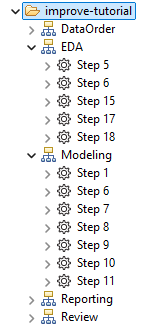
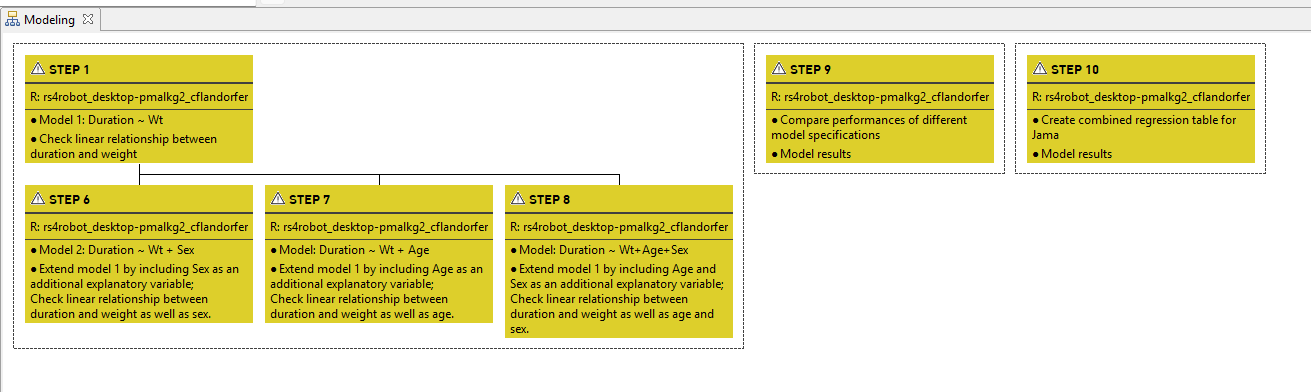
File-centric perspective: Focuses on how files inside different steps are related in terms of their creation, which is more akin to a vertical angle. This perspective is visualized in improve client’s editor view when displaying an analysis tree (as below in Figure 1).
With this as the background, the current document goes beyond the primarily technical focus of the function references/help files, and seeks to demonstrate the actual application of the step-function family. To do so, throughout the document references to various examples are included.

2 getStep
2.1 Purpose of the function
The getStep function is central when it comes to working with steps specifically and the wider {improveR} ecosystem generally. Calling the function on a step returns a detailed environment object which not only encompasses information on the the step’s own properties, but also on its relation with other steps within the wider workflow as well as additional function definitions to work with this information. The environments generated by getStep() provide the foundational data structures and operational interfaces that enable complex workflow operations, dependencies tracking, and coordinated multi-step analytical pipeline execution.
2.2 Relation to other functions
In the broader {improveR} ecosystem, getStep serves as a critical integration point. It connects individual step management with workflow-level orchestration through getWorkflow. The function supports execution coordination with functions like finishRunResource and runStepResource. It interfaces with the distributed resource management system through authenticated REST API calls and intelligent caching strategies. The step environment created by getStep() includes several functions which further facilitate working with the step: createTemplate(), getStepInventory(), getStepResource(), getStepState(), getStepWithoutCache(), and retrieveMainProcess (for details see below).
2.3 Under the hood
In broad terms, the function works in three steps: First, it loads the step’s information from the server (getStepDf). This confirms the step exists and retrieves its settings, files, and history. Second, it creates a workflow environment (createWorkflow). This sets up tracking for how steps connect and depend on each other. Third, it builds the complete step environment (createStepEnv). This creates a comprehensive structure with all step data, relationships, and methods ready to use.
2.4 Example
Start
To demonstrate the application of getStep() see the example below. As an input the function takes a step’s ident, which can be its path, resource (version) id, full entity (version) id, or short entitiy (version) id.
The returned result is an environment with multiple bindings of different classes.
Example getStep(): Overview of obtained elements’ class
tibble(
  name = ls(envATModelingStep1),
  class = purrr::map_chr(name, \(x) class(get(x, envir = envATModelingStep1)))
) %>% arrange(class)
## # A tibble: 13 × 2
##    name                class
##    <chr>               <chr>
##  1 stepDf              data.frame
##  2 children            environment
##  3 dependencies        environment
##  4 parent              environment
##  5 this                environment
##  6 usage               environment
##  7 workflow            environment
##  8 createTemplate      function
##  9 getStepInventory    function
## 10 getStepResource     function
## 11 getStepState        function
## 12 getStepWithoutCache function
## 13 retrieveMainProcess function
To inspect each of the returned environment’s bindings, click on the elements in the viewer below.
getStepInventory(), getStepState(), getStepWithoutCache(), getStepResource(), retrieveMainProcess() and createTemplate() contain all function definitions, meaning these functions can be called on the obtained environment to get additional details or trigger other actions.
2.5 Details
For a thorough understanding of the output of getStep(), the sections below will look into each element of the obtained step environment.
Show details
children
The environment of the loaded step contains the element children which is again of class environment. Checking its content reveals that at this point it contains only a single element: the function load(). Once this function is called, children becomes additionally populated by four steps, i.e. the child steps.
Call load() function in ‘children’
#content of children binding with only 'load' function
ls(envATModelingStep1$children)
## [1] "load"

#call function load()
envATModelingStep1$children$load()
## 2025-11-27 12:54:46.520461 INFO::adding  Step 6 ST-54651 to children
## 2025-11-27 12:54:49.215101 INFO::adding  Step 7 ST-54672 to children
## 2025-11-27 12:54:52.189779 INFO::adding  Step 1 ST-65316 to children
## 2025-11-27 12:54:54.524482 INFO::adding  Step 8 ST-54675 to children

#show children
listviewer::jsonedit(as.list(envATModelingStep1$children))
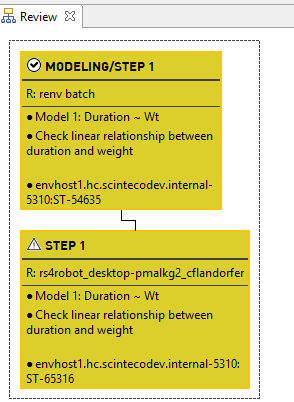
This result is consistent with the output returned by improveR’s getChildSteps() or the pertaining graph in the improve client. Note that in this case, the step has one child in a different analysis tree (Review/Step 1).
Get Step 1’s children via loadChildStep
childATModelingStep1 <- improveR::loadChildSteps("/improve-tutorial/Modeling/Step 1")$data[[1]]
nrow(childATModelingStep1)
## [1] 4
childATModelingStep1 %>% select(path, description)
##                                path                  description
## 1 /improve-tutorial/Modeling/Step 6 Model 2: Duration ~ Wt + Sex
## 2 /improve-tutorial/Modeling/Step 7   Model: Duration ~ Wt + Age
## 3   /improve-tutorial/Review/Step 1       Model 1: Duration ~ Wt
## 4 /improve-tutorial/Modeling/Step 8 Model: Duration ~ Wt+Age+Sex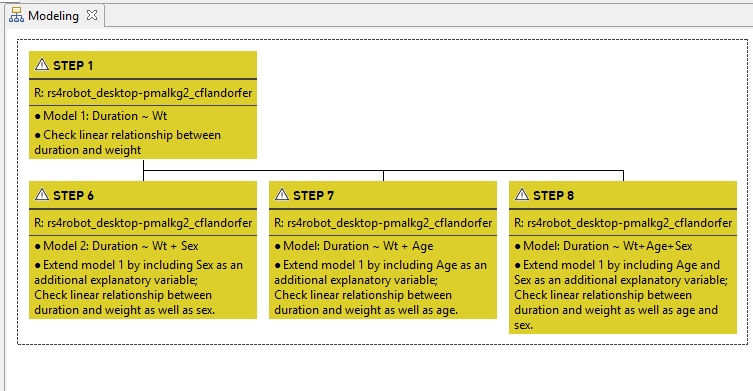
Once loaded, navigating from the step to its children can be conveniently done by simply adding the step’s location to the call, e.g., envATModelingStep1$children$'Modeling/Step 7/54672'. The navigation is facilitated by autocompletion when used in the terminal of RStudio or Positron IDEs (or VS Code with radian extension).
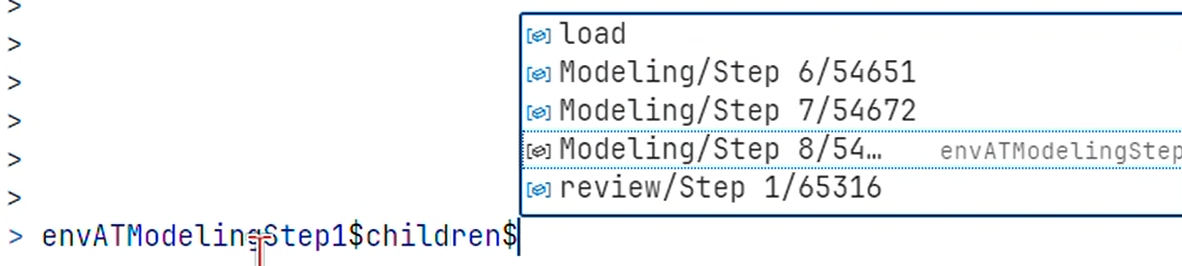
In terms of its structure, the obtained environment of the child step is identical to the one previously obtained for Step 1 and contains again 13 elements, including children and parent.
Below the elements of Modeling/Step 7/54672’s environment.
parent
As with the above described element children, the nested environment parent initially also contains only the function load().
Calling the function here, on /improve-tutorial/Modeling/Step 1, does not return a step since Step 1 does not have a parent (see the image of the analysis tree ‘Modeling’ above, Figure 1). Consequently, the function load() remains the only element of the environment parent.
To properly demonstrate the use of the parent element, let us get a different step, i.e. /improve-tutorial/Modeling/Step 8 which has Step 1 as a parent (see again above, Figure 1).
Load parent of Step 8
#get Step 8
envATModelingStep8 <- getStep("/improve-tutorial/Modeling/Step 8")

#function load() is initially the only element of the parent environment
ls(envATModelingStep8$parent)
## [1] "load"

#call function load()
envATModelingStep8$parent$load()

#`parent` is is now featuring a new element, Step 1
ls(envATModelingStep8$parent)
## [1] "load"                  "Modeling/Step 1/54635"
As shown above, after calling the load() function on the parent environment of Step 8, a new element is added: Modeling/Step 1/54635, which - as we know from above - is the parent of Step 8.
usage
The usage binding is important when it comes to working with existing workflows. For details see here.
The element usage in Step 1’s environment refers to those steps which are directly (‘consumers’) or indirectly (‘indirect consumers’) depending on this step within a specific workflow. ‘Depending’ means in this context that the results produced by the step are used by the subsequent steps. The covered steps are ‘to the right’ or ‘downstream’ in the analysis.
Let’s demonstrate this with the specific example of Step /improve-tutorial/Modeling/Step 1.
After having obtained a step’s environment, its usage related data is not yet available. Solely the function load() is available in envATModelingStep1$usage. Only after having called the function, envATModelingStep1$usage contains details on the downstream steps.
Load usage of Step 1
ls(envATModelingStep1$usage) #function `load()` sole element of `usage`
## [1] "load"

envATModelingStep1$usage$load(stepDepth=-1, treeDepth=-1) #call `load()`
## 2025-11-27 12:55:02.397637 INFO::adding  Step 1 envhost1.hc.scintecodev.internal-5310:ST-62516 to usage
## 2025-11-27 12:55:06.17211 INFO::adding  Step 9 envhost1.hc.scintecodev.internal-5310:ST-54678 to usage
## 2025-11-27 12:55:08.094935 INFO::adding  Step 10 envhost1.hc.scintecodev.internal-5310:ST-59463 to usage
## 2025-11-27 12:55:13.362035 INFO::adding  Step 1 envhost1.hc.scintecodev.internal-5310:ST-64312 to usage
## 2025-11-27 12:55:15.621188 WARNING::Resource with ID: envhost1.hc.scintecodev.internal-5310:FI-54665 could not be loaded
## 2025-11-27 12:55:17.011499 WARNING::Resource with ID: envhost1.hc.scintecodev.internal-5310:FI-56117 could not be loaded
## 2025-11-27 12:55:17.515707 WARNING::Resource with ID: envhost1.hc.scintecodev.internal-5310:FI-54665 could not be loaded
## 2025-11-27 12:55:17.608173 WARNING::Resource with ID: envhost1.hc.scintecodev.internal-5310:FI-56117 could not be loaded

ls(envATModelingStep1$usage)
## [1] "load"                   "Modeling/Step 10/59463" "Modeling/Step 9/54678"  "Reporting/Step 1/62516" "Reporting/Step 1/64312"
listviewer::jsonedit(as.list(envATModelingStep1))
The usage element provides insights into all steps that directly or indirectly depend on the current step within a workflow. After calling load(), the environment is populated with downstream step information, allowing the user to trace how the step’s results propagate through the analysis.
How encompassing a step’s usage is loaded, i.e. how far downstream steps should retrieved, is specified by the load() function’s stepDepth and treeDepth parameters. A value of stepDepth==1 covers all steps which are directly following the step in question. A value of 2 casts the net wider and returns also those steps which are directly following the steps which were retrieved with the value 1. The value can be increased as deemed useful. A value of -1 is the most far-reaching and returns all steps which make use of the initially retrieved step.
Similarly, the function argument treeDepth defines over how many analysis trees a step’s usage should be loaded.
Parameter stepDepth and treeDepth
Parameter stepDepth and treeDepth
envATModelingStep1$usage$load(stepDepth=1, treeDepth=1)
## 2025-11-27 12:55:41.440084 INFO::adding  Step 1 envhost1.hc.scintecodev.internal-5310:ST-62516 to usage
## 2025-11-27 12:55:42.479074 INFO::adding  Step 9 envhost1.hc.scintecodev.internal-5310:ST-54678 to usage
## 2025-11-27 12:55:43.652314 INFO::adding  Step 10 envhost1.hc.scintecodev.internal-5310:ST-59463 to usage
envATModelingStep1$usage$load(treeDepth=0)

listviewer::jsonedit(as.list(envATModelingStep1$usage)) dependencies
The element dependencies inside Step 1’s environment is the counterpart to usage. It includes steps which are upstream or ‘to the left’ of Step 1. In other words, it refers to those steps of which the step in question, i.e. here Step 1 of the analysis tree ‘Modeling’, is depending on. The parameter stepDepth and treeDepth again define the scope (or width) of the function call load().
Code
envATModelingStep1$dependencies$load(stepDepth=-1, treeDepth=-1)
x <- envATModelingStep1$workflow$df()

envATModelingStep1$dependencies$load(treeDepth=-1)
ls(envATModelingStep1$dependencies)
## [1] "load"stepDf
stepDf is another element included in the environment which was returned by getStep(). It is a data frame and contains metadata on the step. Two columns in stepDf should be highlighted here: processes and remoteFiles.
processes is a list column (a nested data frame) which provides details on the tool and related processes steering the execution of the pertaining step. This data reflects the information shown in the tool tab of the step in improve’s client.
Details of stepDf
Details of stepDf
envATModelingStep1$stepDf$processes[[1]]
##                                 handle runserverLabel toolLabel toolInstance                                                                                                                                                                    toolArgs   toolStreamablePatterns selected gridTool main name processType position gridArguments
## 1 435cbf97-9286-4c09-90f2-64eba6dd8df5      runserver     R_4.2   renv batch -e\r\nIMPROVER_TOKEN=<jwt>\r\n-e\r\nIMPROVER_STEP=<step-entityId>\r\n-e\r\nIMPROVER_REPO_URL=<repoUrl>\r\nscinteco/imrstudio:rockerrstudio4.4.2ir1.3.0b59\r\n<command-file> *.txt\r\n*.out\r\n*.Rout     TRUE     TRUE TRUE Main        main        1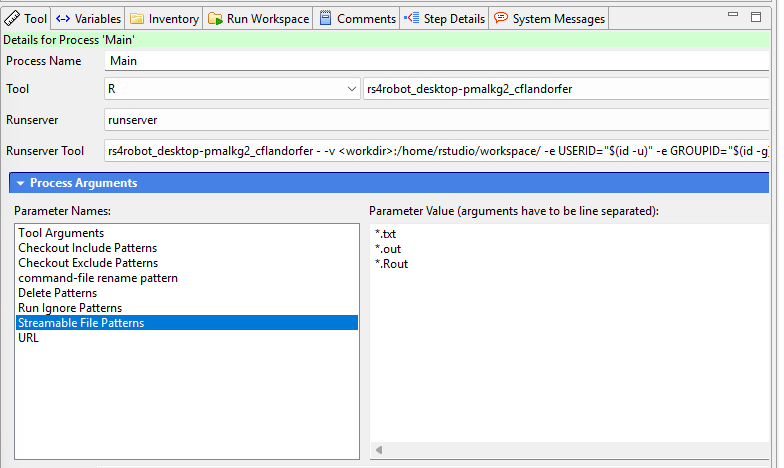
The second column of stepDf which needs highlighting is remoteFiles. It is again a list-column containing a data frame. This data frame presents details on those files which are inputs into step 1, and get further processed when the step is executed. Critically, it also features the column asLink which indicates whether the file is stored inside the step’s inventory or linked from another step.
getStepInventory
The binding getStepInventory stored inside Step 1’s environment is of class function and contains the function’s definition.
Definition of getStepInventory
class(envATModelingStep1$getStepInventory)
## [1] "function"
Calling the function returns the inventory of the step. Note that in contrast to the above described load() functions related to children and parent, the getStepInventory() function does not load the inventory into the step’s environment, but returns it as a data frame. In other words, while envATModelingStep1$children$load() triggers a ‘side-effect’ to modify the step’s environment, getStepInventory() does not modify the environment but returns its output. The returned data frame contains the list column data which provides the details on each of the inventory’s files.
Apply function
#apply function to Step 1's environment
stepInventory <- envATModelingStep1$getStepInventory()

stepInventoryData <- stepInventory %>%
unnest_longer(data) %>%
unnest_wider(data, names_sep="_")

class(stepInventory)
## [1] "data.frame"
glimpse(stepInventoryData)
## Rows: 8
## Columns: 35
## $ type                           <chr> "inventory", "inventory", "inventory", "inventory", "inventory", "inventory", "inventory", "inventory"
## $ resourceId                     <chr> "70BF16ADD9484B7EA0A933B72544C2A3", "70BF16ADD9484B7EA0A933B72544C2A3", "70BF16ADD9484B7EA0A933B72544C2A3", "70BF16ADD9484B7EA0A933B72544C2A3", "70BF16ADD9484B7EA0A933B72544C2A3", "70BF16ADD9484B7EA0A933B72544C2A3", "70BF16ADD9484B7EA0A933B72544C2A3", "70BF16ADD9484B7EA0A933B72544C2A3"
## $ entityId                       <chr> "envhost1.hc.scintecodev.internal-5310:ST-54635", "envhost1.hc.scintecodev.internal-5310:ST-54635", "envhost1.hc.scintecodev.internal-5310:ST-54635", "envhost1.hc.scintecodev.internal-5310:ST-54635", "envhost1.hc.scintecodev.internal-5310:ST-54635", "envhost1.hc.scintecodev.internal-5310:ST-54635", "envhost1.hc.scintecodev.internal-5310:ST-54635", "envhost1.hc.scintecodev.internal-5310:ST-54635"
## $ entityVersionId                <chr> "envhost1.hc.scintecodev.internal-5310:ST-54635-13", "envhost1.hc.scintecodev.internal-5310:ST-54635-13", "envhost1.hc.scintecodev.internal-5310:ST-54635-13", "envhost1.hc.scintecodev.internal-5310:ST-54635-13", "envhost1.hc.scintecodev.internal-5310:ST-54635-13", "envhost1.hc.scintecodev.internal-5310:ST-54635-13", "envhost1.hc.scintecodev.internal-5310:ST-54635-13", "envhost1.hc.scintecodev.internal-5310:ST-54635-13"
## $ path                           <chr> "/improve-tutorial/Modeling/Step 1", "/improve-tutorial/Modeling/Step 1", "/improve-tutorial/Modeling/Step 1", "/improve-tutorial/Modeling/Step 1", "/improve-tutorial/Modeling/Step 1", "/improve-tutorial/Modeling/Step 1", "/improve-tutorial/Modeling/Step 1", "/improve-tutorial/Modeling/Step 1"
## $ name                           <chr> "Step 1", "Step 1", "Step 1", "Step 1", "Step 1", "Step 1", "Step 1", "Step 1"
## $ data_resourceId                <chr> "46DC00CF0C374BAA8EBDE2A8AB86AAEC", "DB346E816E4C4620BFEE054C312A9BC3", "72F71B64C7E74330B0D7348242E25067", "FDBF80F73533490484C7D4B53B447B70", "A7BA5F26B1444BFDBEBE951FF0102398", "FA88F38A5AC948F19F9852046F356DEE", "9F4766EE0FF04CAEAA1BE36AAE2ACC91", "C3328A2F9AE54F3D832D5382566C32E8"
## $ data_resourceVersionId         <chr> "3666FAE5861B449EB62DB6E1CFBDB174", "3409DCCCC6F246D583914F2BEBF74566", "E07A2A2F687740148883C93D5868F605", "C722486A92C644E283F45159AF2F2054", "A43E60A4029442C48EA7904F5241DFC3", "F7F229272F7D4AC19D69BE9A61FE7D4F", "483521388CF24AD58CAED614CBFBAC88", "5AC324A2039E464792D5077BA338ACE6"
## $ data_nodeType                  <chr> "File", "File", "File", "File", "File", "File", "File", "File"
## $ data_name                      <chr> "graphPerformanceModWt.png", "_STDERR.txt", ".gridhost", "tabmodWtEstimates.png", "_STDOUT.txt", "Model.r", "modWt.RDS", "tabmodWtEstimates.html"
## $ data_parentId                  <chr> "70BF16ADD9484B7EA0A933B72544C2A3", "70BF16ADD9484B7EA0A933B72544C2A3", "70BF16ADD9484B7EA0A933B72544C2A3", "70BF16ADD9484B7EA0A933B72544C2A3", "70BF16ADD9484B7EA0A933B72544C2A3", "70BF16ADD9484B7EA0A933B72544C2A3", "70BF16ADD9484B7EA0A933B72544C2A3", "70BF16ADD9484B7EA0A933B72544C2A3"
## $ data_deleted                   <lgl> FALSE, FALSE, FALSE, FALSE, FALSE, FALSE, FALSE, FALSE
## $ data_entityId                  <chr> "envhost1.hc.scintecodev.internal-5310:FI-114626", "envhost1.hc.scintecodev.internal-5310:FI-114625", "envhost1.hc.scintecodev.internal-5310:FI-114624", "envhost1.hc.scintecodev.internal-5310:FI-114736", "envhost1.hc.scintecodev.internal-5310:FI-114623", "envhost1.hc.scintecodev.internal-5310:FI-54636", "envhost1.hc.scintecodev.internal-5310:FI-114627", "envhost1.hc.scintecodev.internal-5310:FI-114628"
## $ data_entityVersionId           <chr> "envhost1.hc.scintecodev.internal-5310:FI-114626-16", "envhost1.hc.scintecodev.internal-5310:FI-114625-20", "envhost1.hc.scintecodev.internal-5310:FI-114624-20", "envhost1.hc.scintecodev.internal-5310:FI-114736-13", "envhost1.hc.scintecodev.internal-5310:FI-114623-20", "envhost1.hc.scintecodev.internal-5310:FI-54636-25", "envhost1.hc.scintecodev.internal-5310:FI-114627-16", "envhost1.hc.scintecodev.internal-5310:FI-114628-16"
## $ data_fullEntityId              <chr> "http://envhost1.hc.scintecodev.internal:5310/provider/provide?client=local&resourceId=envhost1.hc.scintecodev.internal-5310:FI-114626", "http://envhost1.hc.scintecodev.internal:5310/provider/provide?client=local&resourceId=envhost1.hc.scintecodev.internal-5310:FI-114625", "http://envhost1.hc.scintecodev.internal:5310/provider/provide?client=local&resourceId=envhost1.hc.scintecodev.internal-5310:FI-114624", "http://envhost1.hc.scintecodev.internal:5310/provider/provide?client=local&resourceId=envhost1.hc.scintecodev.internal-5310:FI-114736", "http://envhost1.hc.scintecodev.internal:5310/provider/provide?client=local&resourceId=envhost1.hc.scintecodev.internal-5310:FI-114623", "http://envhost1.hc.scintecodev.internal:5310/provider/provide?client=local&resourceId=envhost1.hc.scintecodev.internal-5310:FI-54636", "http://envhost1.hc.scintecodev.internal:5310/provider/provide?client=local&resourceId=envhost1.hc.scintecodev.internal-5310:FI-114627", "http://envhost1.hc.scintecodev.internal:5310/provider/provide?client=local&resourceId=envhost1.hc.scintecodev.internal-5310:FI-114628"
## $ data_fullEntityVersionId       <chr> "http://envhost1.hc.scintecodev.internal:5310/provider/provide?client=local&resourceId=envhost1.hc.scintecodev.internal-5310:FI-114626-16", "http://envhost1.hc.scintecodev.internal:5310/provider/provide?client=local&resourceId=envhost1.hc.scintecodev.internal-5310:FI-114625-20", "http://envhost1.hc.scintecodev.internal:5310/provider/provide?client=local&resourceId=envhost1.hc.scintecodev.internal-5310:FI-114624-20", "http://envhost1.hc.scintecodev.internal:5310/provider/provide?client=local&resourceId=envhost1.hc.scintecodev.internal-5310:FI-114736-13", "http://envhost1.hc.scintecodev.internal:5310/provider/provide?client=local&resourceId=envhost1.hc.scintecodev.internal-5310:FI-114623-20", "http://envhost1.hc.scintecodev.internal:5310/provider/provide?client=local&resourceId=envhost1.hc.scintecodev.internal-5310:FI-54636-25", "http://envhost1.hc.scintecodev.internal:5310/provider/provide?client=local&resourceId=envhost1.hc.scintecodev.internal-5310:FI-114627-16", "http://envhost1.hc.scintecodev.internal:5310/provider/provide?client=local&resourceId=envhost1.hc.scintecodev.internal-5310:FI-114628-16"
## $ data_revisionId                <chr> "664B246ACC8D40FEBEA2C9E0527A00E1", "664B246ACC8D40FEBEA2C9E0527A00E1", "664B246ACC8D40FEBEA2C9E0527A00E1", "664B246ACC8D40FEBEA2C9E0527A00E1", "664B246ACC8D40FEBEA2C9E0527A00E1", "664B246ACC8D40FEBEA2C9E0527A00E1", "664B246ACC8D40FEBEA2C9E0527A00E1", "664B246ACC8D40FEBEA2C9E0527A00E1"
## $ data_createdByName             <chr> "Administrator", "Administrator", "Administrator", "Administrator", "Administrator", "Wolfgang Schwarzenbrunner", "Administrator", "Administrator"
## $ data_createdById               <chr> "1594E8ED57E6C30BE063030011ACA58C", "1594E8ED57E6C30BE063030011ACA58C", "1594E8ED57E6C30BE063030011ACA58C", "1594E8ED57E6C30BE063030011ACA58C", "1594E8ED57E6C30BE063030011ACA58C", "98E5D50FCFE64B6B8128C35ADA89BA4D", "1594E8ED57E6C30BE063030011ACA58C", "1594E8ED57E6C30BE063030011ACA58C"
## $ data_createdAt                 <dbl> 1.760527e+12, 1.760527e+12, 1.760527e+12, 1.760541e+12, 1.760527e+12, 1.745397e+12, 1.760527e+12, 1.760527e+12
## $ data_lastModifiedOn            <dbl> 1.762859e+12, 1.762859e+12, 1.762859e+12, 1.762859e+12, 1.762859e+12, 1.762859e+12, 1.762859e+12, 1.762859e+12
## $ data_lastModifiedById          <chr> "1594E8ED57E6C30BE063030011ACA58C", "1594E8ED57E6C30BE063030011ACA58C", "1594E8ED57E6C30BE063030011ACA58C", "1594E8ED57E6C30BE063030011ACA58C", "1594E8ED57E6C30BE063030011ACA58C", "1594E8ED57E6C30BE063030011ACA58C", "1594E8ED57E6C30BE063030011ACA58C", "1594E8ED57E6C30BE063030011ACA58C"
## $ data_lastModifiedByName        <chr> "Administrator", "Administrator", "Administrator", "Administrator", "Administrator", "Administrator", "Administrator", "Administrator"
## $ data_status                    <chr> "Complete", "Complete", "Complete", "Complete", "Complete", "Complete", "Complete", "Complete"
## $ data_fileSize                  <int> 348598, 44977, 10, 26115, 227, 1820, 3135, 15601
## $ data_fileHash                  <chr> "F7099CD1D479ACD3CD53038EB1108FD1BFAEC6520B15424842AD0F7905A2F56A", "E228B6A0854A8862D859298ADC5AA40865686E4920E03BE817A72D87E23F634A", "346840D5A3D9FE9B61CE99955BB98DF3DB872090732C96AA5DF1D83CB1F3E85A", "0526BDE7F84406FA4AF32B339375B5B3A48D902561EB9AC1DFA9A43004AC2669", "C9452C17C06E516FCD1F211F9604431EA2F6855E5A5034CD7A2F99617EB9CD97", "6DF66C52DE8526A52A5B84751969FC5776B9795BD9201796FA12DC749DBE0C1C", "427EE643143FE32F11E5195A3CDB78E10F7FA117F0D428E50B1D3317AD673A08", "67301F65A1270020B8CFF6FA22DF38CF30DE090110C2E4BD1A843F89D0903699"
## $ data_hasChildren               <lgl> FALSE, FALSE, FALSE, FALSE, FALSE, FALSE, FALSE, FALSE
## $ data_hasChildrenIncludingFiles <lgl> FALSE, FALSE, FALSE, FALSE, FALSE, FALSE, FALSE, FALSE
## $ data_path                      <chr> "/improve-tutorial/Modeling/Step 1/graphPerformanceModWt.png", "/improve-tutorial/Modeling/Step 1/_STDERR.txt", "/improve-tutorial/Modeling/Step 1/.gridhost", "/improve-tutorial/Modeling/Step 1/tabmodWtEstimates.png", "/improve-tutorial/Modeling/Step 1/_STDOUT.txt", "/improve-tutorial/Modeling/Step 1/Model.r", "/improve-tutorial/Modeling/Step 1/modWt.RDS", "/improve-tutorial/Modeling/Step 1/tabmodWtEstimates.html"
## $ data_outdatedLink              <lgl> FALSE, FALSE, FALSE, FALSE, FALSE, FALSE, FALSE, FALSE
## $ data_finishedStatus            <chr> "unfinished", "unfinished", "unfinished", "unfinished", "unfinished", "unfinished", "unfinished", "unfinished"
## $ data_lastModifiedOnDate        <dttm> 2025-11-11 11:57:04, 2025-11-11 11:57:04, 2025-11-11 11:57:04, 2025-11-11 11:57:04, 2025-11-11 11:57:04, 2025-11-11 11:57:04, 2025-11-11 11:57:04, 2025-11-11 11:57:04
## $ data_createdAtDate             <dttm> 2025-10-15 13:18:30, 2025-10-15 13:13:15, 2025-10-15 13:13:15, 2025-10-15 17:07:46, 2025-10-15 13:13:15, 2025-04-23 10:25:08, 2025-10-15 13:18:30, 2025-10-15 13:18:30
## $ data_isVersion                 <lgl> FALSE, FALSE, FALSE, FALSE, FALSE, FALSE, FALSE, FALSE
## $ data_inventoryPath             <chr> "graphPerformanceModWt.png", "_STDERR.txt", ".gridhost", "tabmodWtEstimates.png", "_STDOUT.txt", "Model.r", "modWt.RDS", "tabmodWtEstimates.html"

stepInventoryData %>%
select(
  data_name
)
## # A tibble: 8 × 1
##   data_name
##   <chr>
## 1 graphPerformanceModWt.png
## 2 _STDERR.txt
## 3 .gridhost
## 4 tabmodWtEstimates.png
## 5 _STDOUT.txt
## 6 Model.r
## 7 modWt.RDS
## 8 tabmodWtEstimates.html
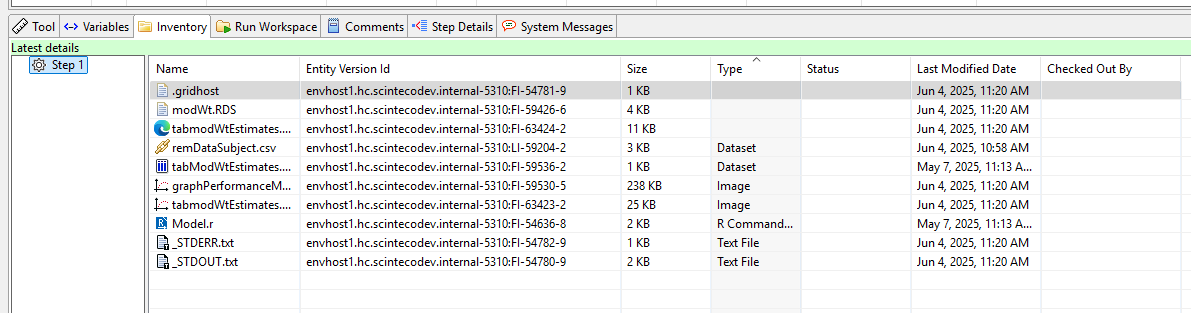
To demonstrate getStepInventory()’s connection to the improve client, below is the pertaining inventory represented in the client.
getStepResource()
Similar to getStepInventory(), getStepResource() is a binding in envATModelingStep1 of class function. Calling it returns a data frame containing the resource details on Step 1. Under the hood, it calls ‘improveR::loadResource()’.
Get step resources
stepResource <- envATModelingStep1$getStepResource()
glimpse(stepResource)
## Rows: 1
## Columns: 43
## $ resourceId                <chr> "70BF16ADD9484B7EA0A933B72544C2A3"
## $ description               <chr> "Model 1: Duration ~ Wt"
## $ rationale                 <chr> "Investigate linear relationship"
## $ resourceVersionId         <chr> "11F23FED8B8348D3886B5C65575EF67F"
## $ nodeType                  <chr> "Step"
## $ name                      <chr> "Step 1"
## $ parentId                  <chr> "A0D580FB7DE64E5690BCEBAEC951141C"
## $ deleted                   <lgl> FALSE
## $ entityId                  <chr> "envhost1.hc.scintecodev.internal-5310:ST-54635"
## $ entityVersionId           <chr> "envhost1.hc.scintecodev.internal-5310:ST-54635-13"
## $ fullEntityId              <chr> "http://envhost1.hc.scintecodev.internal:5310/provider/provide?client=local&resourceId=envhost1.hc.scintecodev.internal-5310:ST-54635"
## $ fullEntityVersionId       <chr> "http://envhost1.hc.scintecodev.internal:5310/provider/provide?client=local&resourceId=envhost1.hc.scintecodev.internal-5310:ST-54635-13"
## $ revisionId                <chr> "664B246ACC8D40FEBEA2C9E0527A00E1"
## $ createdByName             <chr> "Wolfgang Schwarzenbrunner"
## $ createdById               <chr> "98E5D50FCFE64B6B8128C35ADA89BA4D"
## $ createdAt                 <dbl> 1.745397e+12
## $ lastModifiedOn            <dbl> 1.762859e+12
## $ lastModifiedById          <chr> "1594E8ED57E6C30BE063030011ACA58C"
## $ lastModifiedByName        <chr> "Administrator"
## $ fileSize                  <int> 0
## $ hasChildren               <lgl> FALSE
## $ hasChildrenIncludingFiles <lgl> TRUE
## $ path                      <chr> "/improve-tutorial/Modeling/Step 1"
## $ outdatedLink              <lgl> FALSE
## $ finishedStatus            <chr> "unfinished"
## $ toolCategory              <chr> "rlang"
## $ toolId                    <chr> "CDB597C3EBF64B27AE573C3A70B85ADB"
## $ runStatus                 <chr> "FINISHED"
## $ keyStep                   <lgl> FALSE
## $ baseModel                 <lgl> FALSE
## $ fullModel                 <lgl> FALSE
## $ finalModel                <lgl> FALSE
## $ referenceModel            <lgl> FALSE
## $ ownedById                 <chr> "1594E8ED57E6C30BE063030011ACA58C"
## $ processType               <chr> "main"
## $ processName               <chr> "Main"
## $ runserverUrl              <chr> "http://envhost1.hc.scintecodev.internal:5330/runserver/run"
## $ runserverLocal            <lgl> FALSE
## $ runserverReproducible     <lgl> FALSE
## $ runserver                 <chr> "http://envhost1.hc.scintecodev.internal:5330/runserver/run"
## $ lastModifiedOnDate        <dttm> 2025-11-11 11:57:04
## $ createdAtDate             <dttm> 2025-04-23 10:25:08
## $ isVersion <lgl> FALSEretrieveMainProcess
retrieveMainProcess is of class function. When called it extracts the process of type ‘main’ from the step’s processes.
Call function retrieveMainProcess
envATModelingStep1$retrieveMainProcess()
##                                 handle runserverLabel toolLabel toolInstance                                                                                                                                                                    toolArgs   toolStreamablePatterns selected gridTool main name processType position gridArguments
## 1 435cbf97-9286-4c09-90f2-64eba6dd8df5      runserver     R_4.2   renv batch -e\r\nIMPROVER_TOKEN=<jwt>\r\n-e\r\nIMPROVER_STEP=<step-entityId>\r\n-e\r\nIMPROVER_REPO_URL=<repoUrl>\r\nscinteco/imrstudio:rockerrstudio4.4.2ir1.3.0b59\r\n<command-file> *.txt\r\n*.out\r\n*.Rout     TRUE     TRUE TRUE Main        main        1
The output is the filtered result of the processes stored in the stepDf binding. In the present case of Step 1, there is only the main process.
getStepState
The binding getStepState inside the obtained step environment holds a function which returns the state of the step: “Initial”, “Running”, “Terminated”, “Finished”, “Error”, “Outdated Link”, or “Outdated”.
Call getStepState
envATModelingStep1$getStepState()
## [1] "FINISHED"getStepWithoutCache
The function getStepWithoutCache() loads the step resource directly from the server (using improveR:::internalLoadResourceFromServer()), bypassing any local cache. It returns up-to-date information about a step from the server, ignoring any cached or potentially stale local data.
Call getStepWithoutCache
envATModelingStep1$getStepWithoutCache()
##                         resourceId            description                       rationale                resourceVersionId nodeType   name                         parentId deleted                                       entityId                                   entityVersionId                                                                                                                         fullEntityId                                                                                                                     fullEntityVersionId                       revisionId             createdByName                      createdById    createdAt lastModifiedOn                 lastModifiedById lastModifiedByName fileSize hasChildren hasChildrenIncludingFiles                              path outdatedLink finishedStatus toolCategory                           toolId runStatus keyStep baseModel fullModel finalModel referenceModel                        ownedById processType processName                                               runserverUrl runserverLocal runserverReproducible                                                  runserver  lastModifiedOnDate       createdAtDate isVersion
## 1 70BF16ADD9484B7EA0A933B72544C2A3 Model 1: Duration ~ Wt Investigate linear relationship 11F23FED8B8348D3886B5C65575EF67F Step Step 1 A0D580FB7DE64E5690BCEBAEC951141C FALSE envhost1.hc.scintecodev.internal-5310:ST-54635 envhost1.hc.scintecodev.internal-5310:ST-54635-13 http://envhost1.hc.scintecodev.internal:5310/provider/provide?client=local&resourceId=envhost1.hc.scintecodev.internal-5310:ST-54635 http://envhost1.hc.scintecodev.internal:5310/provider/provide?client=local&resourceId=envhost1.hc.scintecodev.internal-5310:ST-54635-13 664B246ACC8D40FEBEA2C9E0527A00E1 Wolfgang Schwarzenbrunner 98E5D50FCFE64B6B8128C35ADA89BA4D 1.745397e+12 1.762859e+12 1594E8ED57E6C30BE063030011ACA58C Administrator 0 FALSE TRUE /improve-tutorial/Modeling/Step 1 FALSE unfinished rlang CDB597C3EBF64B27AE573C3A70B85ADB FINISHED FALSE FALSE FALSE FALSE FALSE 1594E8ED57E6C30BE063030011ACA58C main Main http://envhost1.hc.scintecodev.internal:5330/runserver/run FALSE FALSE http://envhost1.hc.scintecodev.internal:5330/runserver/run 2025-11-11 11:57:04 2025-04-23 10:25:08 FALSEthis
The this binding is a self-reference of the step’s environment. It enables function calls to make a reference to the environment itself.
Use of ‘this’ binding
x <- envATModelingStep1$this$getStepInventory()
y <- envATModelingStep1$getStepInventory()
identical(x, y)
## [1] TRUE
3 attachStep
3.1 Purpose of the function
The attachStep function establishes hierarchical relationships between steps in {improveR} workflows by attaching a step to another step that serves as its parent. This function is essential for creating structured hierarchies that reflect the logical flow and dependencies between analytical steps. It provides flexibility to reorganize existing workflows, insert new steps into established processes, or correct relationships that were initially configured incorrectly, while maintaining workflow integrity and enabling proper execution planning and dependencies tracking.
3.2 Relation to other functions
Within the step functions family, attachStep() forms a complementary pair with detachStep() for managing step hierarchy, working together with createStep() to provide complete workflow structure control. The function integrates closely with navigation functions like getStep(), loadParentStep(), and loadChildSteps() by ensuring cached relationships are updated through unloadParentStep() calls. In the broader {improveR} ecosystem, it connects with the resource management system via loadResource().
3.3 Under the hood
In broad terms, the function works in three steps: First, it validates both the step and parent exist (loadResource()). This confirms the entities are valid and retrieves the workflow context information. Second, it creates the parent-child relationship through an API request. This updates the hierarchy on the server by linking the step to its new parent. Third, it clears cached relationship data (unloadParentStep()). This ensures that subsequent navigation operations see the updated hierarchy instead of outdated information.
3.4 Example
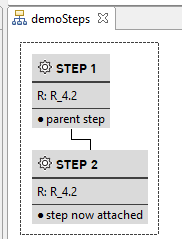
Attach Step 2 to Step 1
step1Parent <- "/improve-tutorial/demoSteps/Step 1"
step2Child <- "/improve-tutorial/demoSteps/Step 2"

attachStep(ident=step2Child, parent=step1Parent)
##                         resourceId       description                resourceVersionId nodeType   name                         parentId deleted                                       entityId                                  entityVersionId                                                                                                                         fullEntityId                                                                                                                    fullEntityVersionId                       revisionId createdByName                      createdById    createdAt lastModifiedOn                 lastModifiedById lastModifiedByName fileSize hasChildren hasChildrenIncludingFiles                               path outdatedLink finishedStatus toolCategory                           toolId runStatus keyStep baseModel fullModel finalModel referenceModel                        ownedById processType processName  lastModifiedOnDate       createdAtDate isVersion
## 1 1155C0A2461349788335BB7903EF765B step now attached 3AC34A4EC3AC423BA52332FC89D9493F     Step Step 2 22F1F10302A74DB686B30D4CE41703EF   FALSE envhost1.hc.scintecodev.internal-5310:ST-91833 envhost1.hc.scintecodev.internal-5310:ST-91833-3 http://envhost1.hc.scintecodev.internal:5310/provider/provide?client=local&resourceId=envhost1.hc.scintecodev.internal-5310:ST-91833 http://envhost1.hc.scintecodev.internal:5310/provider/provide?client=local&resourceId=envhost1.hc.scintecodev.internal-5310:ST-91833-3 7178470414C7483E8413D997B1184A0E Administrator 1594E8ED57E6C30BE063030011ACA58C 1.756309e+12   1.758054e+12 1594E8ED57E6C30BE063030011ACA58C      Administrator        0       FALSE                     FALSE /improve-tutorial/demoSteps/Step 2        FALSE     unfinished        rlang CDB597C3EBF64B27AE573C3A70B85ADB   INITIAL   FALSE     FALSE     FALSE      FALSE          FALSE 1594E8ED57E6C30BE063030011ACA58C        main        Main 2025-09-16 22:18:32 2025-08-27 17:42:01     FALSE

#Verify new structure
loadResource(ident=step1Parent)
##                         resourceId                 description                                                                          rationale                resourceVersionId nodeType   name                         parentId deleted                                       entityId                                  entityVersionId                                                                                                                         fullEntityId                                                                                                                    fullEntityVersionId                       revisionId createdByName                      createdById    createdAt lastModifiedOn                 lastModifiedById lastModifiedByName fileSize hasChildren hasChildrenIncludingFiles                               path outdatedLink finishedStatus toolCategory                           toolId runStatus keyStep baseModel fullModel finalModel referenceModel                        ownedById processType processName  lastModifiedOnDate       createdAtDate isVersion
## 1 F9965BC0D03C42FA8C90ABBFD4CA9706 First step in the analysis. Updated rationale explaining the scientific justification for this analytical step 4B813CD4B2174EAB998A5BC1883CA4F0     Step Step 1 22F1F10302A74DB686B30D4CE41703EF   FALSE envhost1.hc.scintecodev.internal-5310:ST-91832 envhost1.hc.scintecodev.internal-5310:ST-91832-3 http://envhost1.hc.scintecodev.internal:5310/provider/provide?client=local&resourceId=envhost1.hc.scintecodev.internal-5310:ST-91832 http://envhost1.hc.scintecodev.internal:5310/provider/provide?client=local&resourceId=envhost1.hc.scintecodev.internal-5310:ST-91832-3 7178470414C7483E8413D997B1184A0E Administrator 1594E8ED57E6C30BE063030011ACA58C 1.756309e+12   1.758054e+12 1594E8ED57E6C30BE063030011ACA58C      Administrator        0        TRUE                      TRUE /improve-tutorial/demoSteps/Step 1        FALSE     unfinished        rlang CDB597C3EBF64B27AE573C3A70B85ADB   INITIAL   FALSE     FALSE     FALSE      FALSE          FALSE 1594E8ED57E6C30BE063030011ACA58C        main        Main 2025-09-16 22:18:32 2025-08-27 17:41:37     FALSE

step1ParentChild <- loadChildSteps(ident=step1Parent)
step1ParentChild$data[[1]]$name #'Step 2' is shown as child
## [1] "Step 2"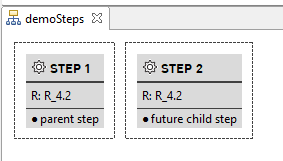
4 detachStep
4.1 Purpose of the function
The detachStep() function is the counterpart to attachStep() and removes the hierarchical relationship between a step and its parent. This function is essential for workflow reorganization, allowing users to isolate steps that were incorrectly attached, flatten complex hierarchies, or prepare steps for reassignment to different parents. It provides the flexibility to modify workflow structures without deleting steps or losing their content, while maintaining data integrity and ensuring that cached relationships are properly updated throughout the system.
4.2 Relation to other functions
Within the step functions family, detachStep() works as the complementary counterpart to attachStep(), providing the opposite operation for managing step hierarchies. It integrates with navigation functions like loadParentStep() and loadChildSteps() by updating cached parent-child relationships through unloadChildSteps() and unloadParentStep() calls. The function works seamlessly with createStep() and other step management functions to provide complete control of the analysis’ structure. In the broader {improveR} ecosystem, it connects with the resource management system via loadResource() for step validation and uses the authentication infrastructure to make REST API calls that persist structural changes across the distributed system.
4.3 Under the hood
In broad terms, the function works in three steps: First, it validates the step exists and retrieves parent information (loadResource()). This confirms the step is valid and retrieves the workflow context and current parent relationship. Second, it removes the parent-child relationship through an API request. This updates the hierarchy on the server by breaking the link between step and parent. Third, it clears cached relationship data on both sides (unloadChildSteps() and unloadParentStep()). This ensures that subsequent navigation operations see the updated hierarchy instead of outdated information.
4.4 Example
Detach step from parent step
#Check presence of child step
loadChildSteps(ident=step1Parent)$data[[1]] #data framew ith nrow 0
##                         resourceId       description                resourceVersionId nodeType   name                         parentId deleted entityId entityVersionId fullEntityId fullEntityVersionId                       revisionId lastModifiedOn                 lastModifiedById lastModifiedByName fileSize hasChildren hasChildrenIncludingFiles                               path outdatedLink finishedStatus runStatus keyStep baseModel fullModel finalModel referenceModel  lastModifiedOnDate
## 1 1155C0A2461349788335BB7903EF765B step now attached 3AC34A4EC3AC423BA52332FC89D9493F     Step Step 2 22F1F10302A74DB686B30D4CE41703EF   FALSE ST-91833      ST-91833-3     ST-91833          ST-91833-3 7178470414C7483E8413D997B1184A0E   1.758054e+12 1594E8ED57E6C30BE063030011ACA58C      Administrator        0       FALSE                     FALSE /improve-tutorial/demoSteps/Step 2        FALSE     unfinished   INITIAL   FALSE     FALSE     FALSE      FALSE          FALSE 2025-09-16 22:18:32


step2Child <- "/improve-tutorial/demoSteps/Step 2"
detachStep(ident=step2Child)
##                         resourceId       description                resourceVersionId nodeType   name                         parentId deleted                                       entityId                                  entityVersionId                                                                                                                         fullEntityId                                                                                                                    fullEntityVersionId                       revisionId createdByName                      createdById    createdAt lastModifiedOn                 lastModifiedById lastModifiedByName fileSize hasChildren hasChildrenIncludingFiles                               path outdatedLink finishedStatus toolCategory                           toolId runStatus keyStep baseModel fullModel finalModel referenceModel                        ownedById processType processName  lastModifiedOnDate       createdAtDate isVersion
## 1 1155C0A2461349788335BB7903EF765B step now attached 3AC34A4EC3AC423BA52332FC89D9493F     Step Step 2 22F1F10302A74DB686B30D4CE41703EF   FALSE envhost1.hc.scintecodev.internal-5310:ST-91833 envhost1.hc.scintecodev.internal-5310:ST-91833-3 http://envhost1.hc.scintecodev.internal:5310/provider/provide?client=local&resourceId=envhost1.hc.scintecodev.internal-5310:ST-91833 http://envhost1.hc.scintecodev.internal:5310/provider/provide?client=local&resourceId=envhost1.hc.scintecodev.internal-5310:ST-91833-3 7178470414C7483E8413D997B1184A0E Administrator 1594E8ED57E6C30BE063030011ACA58C 1.756309e+12   1.758054e+12 1594E8ED57E6C30BE063030011ACA58C      Administrator        0       FALSE                     FALSE /improve-tutorial/demoSteps/Step 2        FALSE     unfinished        rlang CDB597C3EBF64B27AE573C3A70B85ADB   INITIAL   FALSE     FALSE     FALSE      FALSE          FALSE 1594E8ED57E6C30BE063030011ACA58C        main        Main 2025-09-16 22:18:32 2025-08-27 17:42:01     FALSE

#Verify new structure
loadChildSteps(ident=step1Parent)$data[[1]] #data framew ith nrow 0
## data frame with 0 columns and 0 rows
Note that when calling loadChildStep, the details on the child step(s) are stored in the list column data and not on the dataframe’s top level.
5 changeStepDescription
5.1 Purpose of the function
The changeStepDescription function modifies the description field of an existing step, allowing users to update documentation and clarify the purpose of analytical steps after they have been created. This function is essential for maintaining clear and accurate documentation as analyses evolve, requirements change, or when steps need better descriptions for collaboration and reproducibility. It enables dynamic updating of step metadata without requiring recreation of the entire step or disruption of existing workflow structures and dependencies.
5.2 Relation to other functions
Within the step functions family, changeStepDescription() works alongside changeStepRationale() to provide comprehensive metadata editing capabilities for workflow steps. Both functions share similar implementation patterns and complement getStep() for retrieving step information before modification. The function integrates with improveR’s resource management system through loadResource() and updateResource(), ensuring that description changes are properly persisted and cached correctly. It connects to the broader {improveR} package’s authentication and REST API infrastructure, making authenticated calls to update step metadata on the server while maintaining data consistency across the distributed system.
5.3 Under the hood
The function follows a straightforward workflow: First, it retrieves the current step information (loadResource()). This confirms the step exists and loads its current metadata. Second, it modifies the description property directly on the step entity object. This prepares the updated step data. Third, it sends the modified step to the server via an API request. This persists the new description in the central repository. Finally, it refreshes the local cache (updateResource()). This ensures subsequent operations see the updated description rather than stale data.
5.4 Example
Change description of Step 1
stepIdent <- "/improve-tutorial/demoSteps/Step 1"

loadResource(stepIdent)$description
## [1] "First step in the analysis."

changeStepDescription(ident=stepIdent, description="First step in the linear analysis.")
##                         resourceId                        description                                                                          rationale                resourceVersionId nodeType   name                         parentId deleted                                       entityId                                  entityVersionId                                                                                                                         fullEntityId                                                                                                                    fullEntityVersionId                       revisionId createdByName                      createdById    createdAt lastModifiedOn                 lastModifiedById lastModifiedByName fileSize hasChildren hasChildrenIncludingFiles                               path outdatedLink finishedStatus toolCategory                           toolId runStatus keyStep baseModel fullModel finalModel referenceModel                        ownedById processType processName  lastModifiedOnDate       createdAtDate isVersion
## 1 F9965BC0D03C42FA8C90ABBFD4CA9706 First step in the linear analysis. Updated rationale explaining the scientific justification for this analytical step 4B813CD4B2174EAB998A5BC1883CA4F0     Step Step 1 22F1F10302A74DB686B30D4CE41703EF   FALSE envhost1.hc.scintecodev.internal-5310:ST-91832 envhost1.hc.scintecodev.internal-5310:ST-91832-3 http://envhost1.hc.scintecodev.internal:5310/provider/provide?client=local&resourceId=envhost1.hc.scintecodev.internal-5310:ST-91832 http://envhost1.hc.scintecodev.internal:5310/provider/provide?client=local&resourceId=envhost1.hc.scintecodev.internal-5310:ST-91832-3 7178470414C7483E8413D997B1184A0E Administrator 1594E8ED57E6C30BE063030011ACA58C 1.756309e+12   1.758054e+12 1594E8ED57E6C30BE063030011ACA58C      Administrator        0        TRUE                      TRUE /improve-tutorial/demoSteps/Step 1        FALSE     unfinished        rlang CDB597C3EBF64B27AE573C3A70B85ADB   INITIAL   FALSE     FALSE     FALSE      FALSE          FALSE 1594E8ED57E6C30BE063030011ACA58C        main        Main 2025-09-16 22:18:32 2025-08-27 17:41:37     FALSE

loadResource(stepIdent)$description
## [1] "First step in the linear analysis."
6 changeStepRationale
6.1 Purpose of the function
The changeStepRationale function modifies the rationale field of an existing step, allowing users to update the reasoning and justification for why analytical steps were created and included in the workflow. This function is essential for maintaining clear analytical documentation that explains the scientific or methodological rationale behind each step, supporting reproducible research practices and regulatory compliance. It enables dynamic updating of step justification without requiring recreation of the entire step or disruption of existing workflow structures and dependencies, ensuring that analytical decisions remain well-documented as projects evolve.
6.2 Relation to other functions
Within the step functions family, changeStepRationale() works as a companion to changeStepDescription() to provide comprehensive metadata editing capabilities for steps. Both functions share identical implementation patterns and complement getStep() for retrieving step information before modification. The function integrates seamlessly with {improveR}’s resource management system through loadResource() and updateResource(), ensuring that rationale changes are properly persisted and cached correctly. It connects to the broader {improveR} package’s authentication and REST API infrastructure, making authenticated calls to update step metadata on the server while maintaining data consistency and version control across the distributed system.
6.3 Under the hood
The implementation follows the same load-modify-save pattern as changeStepDescription(): first calling loadResource() to retrieve the current step entity and validate it exists, then directly modifying the rationale property of the step entity object. The function makes an authenticated PUT request to the /resources/{resourceId}/ endpoint, sending the modified step as the request payload to persist changes on the server. Finally, it calls updateResource() to refresh the local cache with the updated step information, ensuring that subsequent operations work with the most current data and maintaining consistency between local and server state.
6.4 Example
Change rationale of Step 1
stepIdent <- "/improve-tutorial/Modeling/Step 1"
loadResource(stepIdent)$rationale
## [1] "Investigate relationship"

changeStepRationale(ident=stepIdent, rationale="Investigate linear relationship")
##                         resourceId            description                       rationale                resourceVersionId nodeType   name                         parentId deleted                                       entityId                                   entityVersionId                                                                                                                         fullEntityId                                                                                                                     fullEntityVersionId                       revisionId             createdByName                      createdById    createdAt lastModifiedOn                 lastModifiedById lastModifiedByName fileSize hasChildren hasChildrenIncludingFiles                              path outdatedLink finishedStatus toolCategory                           toolId runStatus keyStep baseModel fullModel finalModel referenceModel                        ownedById processType processName                                               runserverUrl runserverLocal runserverReproducible                                                  runserver  lastModifiedOnDate       createdAtDate isVersion
## 1 70BF16ADD9484B7EA0A933B72544C2A3 Model 1: Duration ~ Wt Investigate linear relationship 11F23FED8B8348D3886B5C65575EF67F     Step Step 1 A0D580FB7DE64E5690BCEBAEC951141C   FALSE envhost1.hc.scintecodev.internal-5310:ST-54635 envhost1.hc.scintecodev.internal-5310:ST-54635-13 http://envhost1.hc.scintecodev.internal:5310/provider/provide?client=local&resourceId=envhost1.hc.scintecodev.internal-5310:ST-54635 http://envhost1.hc.scintecodev.internal:5310/provider/provide?client=local&resourceId=envhost1.hc.scintecodev.internal-5310:ST-54635-13 664B246ACC8D40FEBEA2C9E0527A00E1 Wolfgang Schwarzenbrunner 98E5D50FCFE64B6B8128C35ADA89BA4D 1.745397e+12   1.762859e+12 1594E8ED57E6C30BE063030011ACA58C      Administrator        0       FALSE                      TRUE /improve-tutorial/Modeling/Step 1        FALSE     unfinished        rlang CDB597C3EBF64B27AE573C3A70B85ADB  FINISHED   FALSE     FALSE     FALSE      FALSE          FALSE 1594E8ED57E6C30BE063030011ACA58C        main        Main http://envhost1.hc.scintecodev.internal:5330/runserver/run          FALSE                 FALSE http://envhost1.hc.scintecodev.internal:5330/runserver/run 2025-11-11 11:57:04 2025-04-23 10:25:08     FALSE

loadResource(stepIdent)$rationale
## [1] "Investigate linear relationship"
7 createStepEnv
The createStepEnv() function constructs a specialized R environment object that encapsulates a step’s complete context and provides programmatic access to all step-related data and operations. This environment serves as a comprehensive interface containing the step’s metadata, file relationships, navigation capabilities, and workflow context in a structured, object-like format. The function creates an environment that includes nested sub-environments for children, parent, usage, and dependencies relationships, along with functional bindings for operations like getStepInventory(), getStepResource(), and getStepState(). This environment-based approach enables intuitive navigation through workflow hierarchies using R’s $ operator and provides a unified API for step manipulation and introspection that supports both interactive analysis and programmatic workflow management.
7.1 Relation to other functions
Within the step functions family, createStepEnv serves as the foundational building block that underlies getStep(), which calls createStepEnv internally to generate the rich environment objects that users interact with. The function works closely with navigation functions like loadChildSteps(), loadParentStep(), and workflow analysis functions by providing the structured environment that contains lazy-loading mechanisms for these relationships. It integrates with resource management functions through embedded loadResource() calls and connects with the broader {improveR} ecosystem by creating environments that interface with authentication systems, caching mechanisms, and REST API endpoints. The environments created by createStepEnv() also support workflow execution functions by providing access to process definitions, file dependencies, and execution state information necessary for step orchestration and dependencies tracking.
7.2 Under the hood
The function builds a step environment in stages. First, it loads the step’s basic information and confirms it exists. Then it creates organized sections for the step’s relationships: children, parent, usage, and dependencies. These sections load their data only when needed to improve performance.
The function adds helpful methods like getStepInventory() and getStepWithoutCache() that you can call directly on the step. It also sets up a workflow environment for managing execution and dependencies. The result contains both the step’s data and the tools you need to work with it.
7.3 Example
Code
stepIdent <- "/improve-tutorial/Modeling/Step 1"

# First, get the stepDf (step metadata) using the internal function
# Note: Users typically use getStep() instead of calling createStepEnv directly
stepDf <- improveR:::getStepDf(stepIdent)
workflow <- createWorkflow()

# Create the step environment with the stepDf
step_env <- createStepEnv(stepDf, workflow)

# Examine the environment structure
ls(step_env)
##  [1] "children"            "createTemplate"      "dependencies"        "getStepInventory"    "getStepResource"     "getStepState"        "getStepWithoutCache" "parent"              "retrieveMainProcess" "stepDf"              "this"                "usage"               "workflow"